
Scientist Gwen's Bloon Lab

“
Scientist Gwen's Bloon Lab is the best place to experiment with different strategies and perfect your tactics. You can change your monkeys at will and have a variety of different tools to conduct experiments and find the best strategy.
— In-game description
— In-game description
”
Scientist Gwen's Bloon Lab is a sandbox mode in Bloons TD Battles 2, introduced in version 4.4. It is accessed from the Solo Play button on the main menu and requires a Club Membership to play.
Controls
edit- Before starting a game in this mode, the player can choose the map and whether to play on the left side or the right side.
- Using Bloon sends sends the Bloons to the player's side, rather than the opponent's.
- Pressing the speed button sets the game speed to 1× speed, 3× speed (similar to Fast Forward in other Bloons TD games), or 0.5× speed. Pressing the pause button sets it to 0× speed.
- The player can set the round to any round from 1 to 100 and play a round at any time, or toggle it to send rounds automatically using the same delay system as in the main game.
- The player can set their current cash and income to any value from 0 to 9,999,999.
- Pressing
 resets the player's lives to 150.
 - Pressing
 toggles the behavior of Bloon sends between three different modes:
- The default behavior.
 Bloon sends are free.
 Bloon sends do not send Bloons and only affect cash and income.
- Toggling
 makes all Bloons invincible by preventing them from losing health or layers when taking damage. Towers attacking them will still register the damage they deal to their damage counters and the stats menu.
 - Pressing
 removes all towers currently on the map.
 - Pressing
 removes all Bloons currently on the map, but does not remove queued Bloon sends.
 - Pressing
 resets all Activated Ability cooldowns.
 - Pressing
 resets all removables and gizmos on the map.
Loadout
editThe player can change their loadout at any time from the loadout tab, though changing it removes all towers on the map. The player can select towers and Heroes they have not unlocked yet, including T5 upgrades of towers.
Stats
editThe stats tab lists various statistics about the game state. They are the same as the stats in Hero Challenge. The stats tab allows the player to reset the stats and the damage/cash counters on towers.
Update history
edit
|
This article or section uses Cargo to generate its content. It will automatically fill up as other articles are completed. To add to this section, create the articles it is looking up. Do not add content to this section manually and do not remove this notice until you are sure this section is complete. |
 A new Advanced tab has been added to the Scientist Gwen’s Bloon lab for more niche and complex controls.
- The Round Stall Amount slider simulates how far the opponent’s natural bloons travel along the track before being popped so you can test strategies in stalling and anti-stalling scenarios.
- The Opponent Hero panel allows you to simulate an opponent using Agent Jericho, Highwayman Jericho, and Star Captain Jericho. The opponent hero’s passive abilities (such as bloon adjustment) will be applied to your rounds and you can activate their abilities against yourself (where relevant).
- The Rush Recording panel allows you to record your bloon sends and play them back against yourself, allowing repeated testing against the same rush or more complex rush layering.
- In addition to the Advanced Tab controls, there is now an option in the Control tab to disable all monkeys when you fall below zero lives in order to see the exact state of your defence[sic] at the moment it failed.
- "Fixed bloon sends getting stuck in the queue when using the Destroy All Bloons button in the Bloon Lab"
Gallery
editScreenshots
edit-
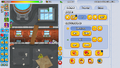 The control tab
 -
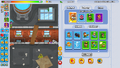 The monkeys tab in the loadout tab
 -
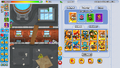 The Heroes tab in the loadout tab
 -
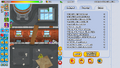 The stats tab
 -
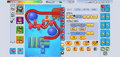 v4.7 control tab, with sent bloons


Assets
edit-
 Mode icon
 -
 Mode window image


Navigation
edit| Modes in Bloons TD Battles 2 | ||||||
|---|---|---|---|---|---|---|
|