User:Polavux/Hacker flag: Difference between revisions
Qwertyxp2000 (talk | contribs) No edit summary |
Qwertyxp2000 (talk | contribs) Slow-witted donkey |
||
| Line 1: | Line 1: | ||
<!-- there is no known flag system in BTD5 or BCS --> | <!-- there is no known flag system in BTD5 or BCS --> | ||
{{Image needed|PNG of the hacker flag in BTD6 (i.e. the two leaves on a Settings button, and a variant with just the two leaves)}} | {{Image needed|PNG of the hacker flag in BTD6 (i.e. the two leaves on a Settings button, and a variant with just the two leaves)}} | ||
The '''hacker flag'''<ref name="support"/> is a [[wikipedia:Flag (programming)|data flag]] (or, in some games, a [[wikipedia:Bit field|set of flags]]) in the player's save file in certain [[Ninja Kiwi]] games that is set if Ninja Kiwi considers the player to be a cheater. When a player's save file is "flagged", certain features in the game behave differently. Usually, games with online play will prevent flagged players from interacting with non-flagged players by placing flagged players in a "hacker pool" that only allows matchmaking with other flagged players. Most games have a subtle visual indicator if the flag is set; for example, in ''[[Bloons TD 6]]'', two small leaves appear behind the settings button on the main menu. The only way to remove the flag through legitimate means is to request Ninja Kiwi's Support Team to remove it. | The '''hacker flag'''<ref name="support"/> is a [[wikipedia:Flag (programming)|data flag]] (or, in some games, a [[wikipedia:Bit field|set of flags]]) in the player's save file in certain [[Ninja Kiwi]] games that is set if Ninja Kiwi considers the player to be a cheater. When a player's save file is "flagged", certain features in the game behave differently. Usually, games with online play will prevent flagged players from interacting with non-flagged players by placing flagged players in a "hacker pool" that only allows matchmaking with other flagged players. Most games have a subtle visual indicator if the flag is set; for example, in ''[[Bloons TD 6]]'', two small leaves appear behind the settings button on the main menu. The only way to remove the flag through legitimate means is to request Ninja Kiwi's Support Team to remove it. | ||
Revision as of 07:23, 17 May 2026

|
This article or section needs more images. The editor who added this notice elaborates: PNG of the hacker flag in BTD6 (i.e. the two leaves on a Settings button, and a variant with just the two leaves) |
The hacker flag[1] is a data flag (or, in some games, a set of flags) in the player's save file in certain Ninja Kiwi games that is set if Ninja Kiwi considers the player to be a cheater. When a player's save file is "flagged", certain features in the game behave differently. Usually, games with online play will prevent flagged players from interacting with non-flagged players by placing flagged players in a "hacker pool" that only allows matchmaking with other flagged players. Most games have a subtle visual indicator if the flag is set; for example, in Bloons TD 6, two small leaves appear behind the settings button on the main menu. The only way to remove the flag through legitimate means is to request Ninja Kiwi's Support Team to remove it.
The way the hacker flag can get set depends on the game. Usually, the game flags the player automatically if it detects that the player altered the game's files, altered the game's memory at runtime, obtained currency or items illegitimately, or achieved impossible scores in events. However, there are cases of players being falsely flagged from game glitches and events where extreme scores are possible to achieve legitimately. The Support Team can also manually flag players reported for cheating.
Ninja Kiwi's support website refers to the state of having a flag as a "flagged account",[1] though this is misleading because the flag is set per game save, not per account; having the flag on one Ninja Kiwi game does not affect any other games on the same account.
Effects of hacker flags in Bloons games
- If the game's cheat detection triggers in the middle of a match, the offending player automatically surrenders. The opponent receives a pop-up message that reads "Your opponent has been disconnected because they weren't playing by the rules!"
- The version number on the main menu and settings displays a space between the "v" and the number, and has a period at the end.
- Online matchmaking only matches flagged players against other flagged players.
- The Weekly Competition menu displays "No data found." on all leaderboards.
-
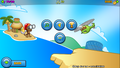 Settings menu
 -
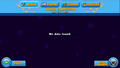 Weekly Competition menu


- When playing on a platform that has in-game advertisements, the game plays forced ads even if the player made purchases to disable them.
- Contested Territory only groups flagged players with other flagged players.

|
This section is empty. You can help out by adding to it. |
- Two leaves appear in the top-left of the settings button on the main menu.
- When the flag is set, the game also resets the player's profile stats (presumably to stop Ninja Kiwi's player analytics from recording illegitimate stats).
- Co-op matchmaking only matches flagged players with other flagged players.
- The player's scores do not register on Race Event and Boss Bloon Event leaderboards. This also prevents the player from earning rewards based on their leaderboard rankings.
- The player cannot access the following events:
- In the Martian Games menu, an animated sword icon appears next to the player's name at all times. Normally, this icon only appears next to other players who are actively playing the map, and never appears next to the name of the same player from their view.
- Martian Games only groups flagged players with other flagged players.
-
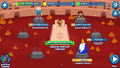 Martian Games' hacker pool from the perspective of the player named "DesArch"

- The version number on the main menu and settings displays a space between the "v" and the number.
- Online matchmaking only matches flagged players against other flagged players.
References
- ↑ 1.0 1.1 "Account Flagged for Hacking". Ninja Kiwi. Retrieved Sat, 16 May 2026.