
User:Qwertyxp2000/Blooncyclopedia:Screenshot guides
This article describes Blooncyclopedia's guidelines for what screenshots are needed and how to take them. In general, screenshots should be used to showcase every unique aspect of the subject, and each screenshot should serve a distinct purpose to avoid crowding galleries with redundant screenshots.
What screenshots are needed
editA screenshot should be used for every distinct element of the subject that cannot be represented more clearly with just text or another kind of image. A subject only needs screenshots that are directly relevant to its page.
- Example
As an example, for Sauda in BTD6, her gallery should have screenshots of:
- Her splash screen when unlocking her
- Her models at levels 1-2, 3-9, 10-19, and 20
- Her attacks and visual effects
- Her abilities in action
- Her Trophy Store cosmetics in action
We do not need screenshots of:
- Her portraits and ability icons (we have raw images of those already)
- Her description and level descriptions (we have raw text of those already)
- The same models and animations as before on different backgrounds (those are not distinct elements of the subject)
- Her with different buffs, unless they have particularly unique interactions
- Images not from BTD6 (e.g. merchandise or The Story of Monkeys vs Bloons)
Specific cases
editBloons TD maps
editBesides the infobox image, a map should only have extra screenshots if it has notable elements that can't be depicted with a single image, such as background objects that appear when clicked on or objects that can be interacted with. Maps in BTD6 and Battles 2 that don't change, such as Monkey Meadow and Glade, should only have screenshots for their seasonal reskins, and most maps in prior games really only need the infobox images.
Bloons levels
editLevels in the Bloons series only need a screenshot of the default state of the level prior to the player taking any actions. If the level has moving Bloons or Camo Bloon, try to take it in a way that shows as many Bloons as possible.
Bloons Supermonkey levels
editLevels in the Bloons Supermonkey series should have multiple screenshots to showcase their unique patterns. The screenshot in the infobox should be of a particularly recognizable formation or setpiece within the level. Supermonkey should be as far out of the way as possible and have the least distracting upgrade/powerup loadout possible. Try to avoid popping any of the Bloons in the formations you want to take screenshots of.
Resolution
edit- Screenshots for games that use a fixed resolution (e.g. all Flash games, PC games that run on Flash like BTD5 Deluxe, and console games) should be taken at their native resolution. (Note that on PCs, you may need to change your DPI settings to display the game at the correct resolution.)
- For games with variable resolutions (e.g. most mobile and PC games), any resolution is allowed, but higher resolutions (around 1080p) are preferred.
Composing screenshots
edit- No overlays. Hide your FPS counters and system controls.
- All cosmetics should be disabled, unless the screenshot is specifically to show cosmetics, in which case they should be the only cosmetics enabled.
- If your screenshot is being used to show a specific thing, such as a character animation, it should be cropped to focus on the subject. (The base screenshot you are cropping from should still follow the resolution guidelines described above.)
- Screenshots should not be visually modified in any way except cropping. This includes, but is not limited to:
- Rotating, flipping, scaling, or distorting
- Changing brightness or saturation
- Adding text, arrows, lines, circles, etc
- Blurring
- AI upscaling
- Screenshots that are merged together are allowed, but only if the organization of the merge is sufficiently neat and does not distract the reader. Try splitting only by side-by-side, and use an appropriate size ratio.
- In cases where the background isn't required to be something specific (i.e. screenshots of towers the Bloons TD series), the background used is up to you, provided it has a good contrast with the primary subject of the screenshot and it isn't too noisy or distracting. For example, you shouldn't be taking screenshots of an Ice Monkey on a snowy map.
Gallery
edit
|
This section is incomplete. You can help out by expanding it. The editor who added this notice elaborates: Add a set of examples of what's a "good" or "bad" image |
Example 1
edit-
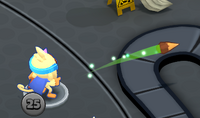 ✅ Clearly shows Thunder Druid's thorn attack in Bloons Card Storm. Background isn't too lack of contrast to the subject.
 -
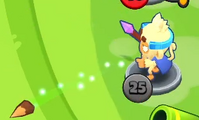 ❌ Not as good, as the trail effect blends in with background. Still okay showcase for Thunder Druid's thorn attack, and crop amount is appropriate.

