Whoops: Difference between revisions
Jump to navigation
Jump to search
mNo edit summary |
Hubianzhen (talk | contribs) No edit summary |
||
| Line 13: | Line 13: | ||
}} | }} | ||
'''Whoops''' is an Advanced [[Power (BCS)|Power]] [[card]] in ''[[Bloons Card Storm]]''. It removes all Ammo from the selected [[Monkey (BCS)|Monkey]]. It requires a target in order to play it, and can target a Monkey on either side. | '''Whoops''' is an Advanced [[Power (BCS)|Power]] [[card]] in ''[[Bloons Card Storm]]''. It removes all Ammo from the selected [[Monkey (BCS)|Monkey]]. It requires a target in order to play it, and can target a Monkey on either side. | ||
==Tips== | |||
*Whoops can be used to disarm an enemy Defender so more damage can get to the opponent. | |||
*If the opponent is trying to use your Defender to activate a Bloon with an On Popped effect, and you can't spread out all of your Defender's damage such that it doesn't pop that Bloon before emptying all of their Ammo, you can use Whoops on that Defender to prevent them from popping that Bloon. | |||
==Gallery== | ==Gallery== | ||
Revision as of 23:31, 2 November 2024
Whoops

|
| Target Monkey loses all ammo |
| Some say lost. Some say stolen. |
| Class |  Advanced Advanced
| |
|---|---|---|
| Card Pack | ||
| Rarity | Uncommon | |
| Keywords | — | |
| Introduced | Full Playable test | |
| Stats | |||||||||
|---|---|---|---|---|---|---|---|---|---|
| Cost |  1 1
|
Charges | 1 | ||||||
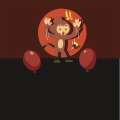
Whoops is an Advanced Power card in Bloons Card Storm. It removes all Ammo from the selected Monkey. It requires a target in order to play it, and can target a Monkey on either side.
Tips
- Whoops can be used to disarm an enemy Defender so more damage can get to the opponent.
- If the opponent is trying to use your Defender to activate a Bloon with an On Popped effect, and you can't spread out all of your Defender's damage such that it doesn't pop that Bloon before emptying all of their Ammo, you can use Whoops on that Defender to prevent them from popping that Bloon.
Gallery

|
This article or section needs more screenshots. See the screenshot guidelines for more information on what screenshots are needed and how to add them. |
-
 Icon
Icon -
 Placeholder art


