Co-op (BTD6): Difference between revisions
m →Ownership: worth clarifying that this is allowed |
No edit summary |
||
| Line 1: | Line 1: | ||
{{for|Co-op in [[Bloons TD 5]]|Co-op (BTD5)}} | {{for|Co-op in [[Bloons TD 5]]|Co-op (BTD5)}} | ||
{{lede image|BTD6 CoOpIcon.png}} | {{lede image|BTD6 CoOpIcon.png}} | ||
'''Co-op''' is a multiplayer mode in ''[[Bloons TD 6]]'', introduced in {{BTD6 version|11.0}} and unlocked at [[level]] 20. It allows two to four players to play in a single game simultaneously. All versions support online play using a peer-to-peer connection | '''Co-op''' is a multiplayer mode in ''[[Bloons TD 6]]'', introduced in {{BTD6 version|11.0}} and unlocked at [[level]] 20. It allows two to four players to play in a single game simultaneously. All versions support online play using a peer-to-peer connection<ref>{{cite|url=https://www.reddit.com/r/btd6/comments/rbhs6d/bloons_td_6_update_notes_version_290/hnoqs0i/|title=rohan_spibo comments on Bloons TD 6 - Update Notes! Version 29.0|author=Rohan Sharpe-Anforth|publisher=Reddit|retrieved=7 apr 2025}}</ref> (albeit proxied through [[wp:Cloudflare|Cloudflare]] to hide each players' [[wp:IP address|IP address]]es), and the [[Bloons TD 6 (console)|console version]] also supports local Co-op. Players can either share the entire map or have their own dedicated sections of the map to place and [[upgrade]] their towers in. Each player has their own [[Hero]] and tier 5 upgrades, though they have to share Hero XP and [[cash]] earned from popping Bloons and at the end of each round. Playing in online Co-op earns separate [[medal]]s from singleplayer, and there are some events that are playable in Co-op. | ||
==Mechanics== | ==Mechanics== | ||
| Line 64: | Line 64: | ||
*On a game over, any player can restart the game or use a [[continue]]. On a victory, any player can start [[freeplay]] mode. There is a grace period between the victory and game over screens appearing where the restart, continue, and freeplay options are not selectable, which allows players to quit before another player performs that action. | *On a game over, any player can restart the game or use a [[continue]]. On a victory, any player can start [[freeplay]] mode. There is a grace period between the victory and game over screens appearing where the restart, continue, and freeplay options are not selectable, which allows players to quit before another player performs that action. | ||
*The player who created the game is the host, indicated by a blue pip next to the player icon in the sidebar for sending and requesting cash. If the host disconnects, the game selects a new host for the match. If the former host reconnects, they do not become the host again unless the current host disconnects and the game selects the former host. | *The player who created the game is the host, indicated by a blue pip next to the player icon in the sidebar for sending and requesting cash. If the host disconnects, the game selects a new host for the match. If the former host reconnects, they do not become the host again unless the current host disconnects and the game selects the former host. | ||
*A player can press the "mute" button next to | *A player can press the "mute" button next to another player's icon in the sidebar to hide emotes and cash requests from them. | ||
===Cash distribution=== | ===Cash distribution=== | ||
Each player starts with the default starting [[cash]] of the selected mode minus $50 per player in the match, except in [[Deflation (BTD6)|Deflation]] mode, [[Boss Bloon Event]]s, [[Boss Challenge]], | Each player starts with the default starting [[cash]] of the selected mode minus $50 per player in the match, except in [[Deflation (BTD6)|Deflation]] mode, [[Boss Bloon Event]]s, [[Boss Challenge]], and Co-op [[Daily Challenge (BTD6)|Daily Challenge]]s, which instead split the starting cash evenly among all players. The extra cash from {{BTD6 mk|More Cash}} is also distributed evenly among all players, provided at least one player has it enabled. All cash earned from popping Bloon layers, and at the end of each round, is split evenly among all players. [[Double Cash Mode (BTD6)|Double Cash Mode]] only doubles the starting cash and cash per pop for players that have it enabled. | ||
Cash generated by [[tower]]s and [[power]]s only goes towards the owner, with a few exceptions: | Cash generated by [[tower]]s and [[power]]s only goes towards the owner, with a few exceptions: | ||
| Line 108: | Line 108: | ||
===Quick Match=== | ===Quick Match=== | ||
[[File:BTD6 coop quick match.png|300px|thumb]] | [[File:BTD6 coop quick match.png|300px|thumb]] | ||
'''Quick Match''' allows the player to join any publicly-hosted | '''Quick Match''' allows the player to join any publicly-hosted match that fits within one of three constraints the player can choose from. If the game does not find a match, it creates a new match with a random [[map]] (using its default map split), [[difficulty]], and mode within the constraints, then assigns the player to that match. If the game creates a match in this way, it can select maps the host has not unlocked yet. | ||
{|class="wikitable" | {|class="wikitable" | ||
!Constraint | !Constraint | ||
| Line 114: | Line 114: | ||
![[Difficulty|Game difficulty]] | ![[Difficulty|Game difficulty]] | ||
!Game mode | !Game mode | ||
!Level unlocked | |||
|- | |- | ||
![[File:BTD6 CoopQuickMatchBtn.png|100px]]<br>Any Game | ![[File:BTD6 CoopQuickMatchBtn.png|100px]]<br>Any Game | ||
| Line 119: | Line 120: | ||
|Any difficulty | |Any difficulty | ||
|Any mode | |Any mode | ||
|20 | |||
|- | |- | ||
![[File:BTD6 CoopMediumMatchBtn.png|100px]]<br>Medium Game | ![[File:BTD6 CoopMediumMatchBtn.png|100px]]<br>Medium Game | ||
| Line 136: | Line 138: | ||
*[[Magic Monkeys Only]] | *[[Magic Monkeys Only]] | ||
*[[Double HP MOABs]] | *[[Double HP MOABs]] | ||
|25 | |||
|- | |- | ||
![[File:BTD6 CoopLongMatchBtn.png|100px]]<br>Long Game | ![[File:BTD6 CoopLongMatchBtn.png|100px]]<br>Long Game | ||
| Line 150: | Line 153: | ||
*[[Impoppable (BTD6)|Impoppable]] | *[[Impoppable (BTD6)|Impoppable]] | ||
*[[CHIMPS]] | *[[CHIMPS]] | ||
|30 | |||
|} | |} | ||
===Create Match=== | ===Create Match=== | ||
[[File:BTD6 coop hosting.png|300px|thumb]] | [[File:BTD6 coop hosting.png|300px|thumb]] | ||
'''Create Match''' allows the player to host a match with | '''Create Match''' allows the player to host a match with the map, map split, difficulty, mode, and number of players of their choosing. The host cannot select maps they have not unlocked yet, nor can they select [[Blons]], [[Protect The Yacht]], or [[Map Editor]] maps. Matches are private by default, but the host can make them public to allow Quick Match players to join. The host can also invite players on their friends list to join the lobby. | ||
===Join Match=== | ===Join Match=== | ||
'''Join Match''' allows the player to enter a public or private match by using a code or by searching for games hosted on the same | '''Join Match''' allows the player to enter a public or private match by using a code or by searching for games hosted on the same [[wp:local area network|local area network]]. | ||
==Modes== | ==Modes== | ||
Revision as of 04:52, 26 January 2026

Co-op is a multiplayer mode in Bloons TD 6, introduced in version 11.0 and unlocked at level 20. It allows two to four players to play in a single game simultaneously. All versions support online play using a peer-to-peer connection[1] (albeit proxied through Cloudflare to hide each players' IP addresses), and the console version also supports local Co-op. Players can either share the entire map or have their own dedicated sections of the map to place and upgrade their towers in. Each player has their own Hero and tier 5 upgrades, though they have to share Hero XP and cash earned from popping Bloons and at the end of each round. Playing in online Co-op earns separate medals from singleplayer, and there are some events that are playable in Co-op.
Mechanics

In a Co-op game, all players play together on a single map with the same pool of lives. Depending on the configuration, the map can be split into multiple sections for each player, or allow all players to place anywhere. Each player can place their own towers and powers and cannot control towers placed by others. In online Co-op, there is a delay between a player inputting an action (such as placing or upgrading a tower) and the action occurring, to allow all players' clients time to sync with each other. Each player has access to their own Hero, tier 5 upgrades, and pool of cash, though some forms of income are split among players. While this allows for multiple Heroes and multiple copies of tier 5 upgrades, the game does not allow multiple copies of Paragons or the VTSG. If playing in a mode with challenge rules, any restrictions on the number of towers will count all players' towers.
The way unlockable features function in Co-op varies:
- Towers and upgrades are only purchasable by players that have unlocked them.
- Monkey Knowledge upgrades apply to all players, even to those who have not unlocked them yet, if at least one player has them unlocked.
- Fast Track Mode applies if at least one player has it enabled.[2]
On the victory screen, every player can receive a different callout based on their actions in the game. Two players cannot receive the same callout.
Ownership

|
This article is in need of research. You can help out by editing this article or discussing your findings on the talk page. The editor who added this notice elaborates: If a player quits, how is ownership of their towers distributed? |
If a player places a tower or uses a power, that player becomes its "owner". Players cannot upgrade, sell, activate the abilities of, or change the targeting options of towers they do not own. For the most part, towers and powers can still interact with towers owned by other players, including providing buffs to them (e.g. Monkey Villages, Alchemists, or Overclock), contributing to Jungle's Bounty, acting as platforms (e.g. Portable Lakes, Carrier Flagship, and Lord of the Abyss), using the Worn Hero's Cape, and sacrificing them (e.g. Sun Temples, True Sun Gods, and Paragons). There are a few exceptions:
- Support Chinooks and Special Poperations cannot reposition or use
 Door Gunner on towers owned by other players.
 - Monkeyopolis cannot absorb Banana Farms owned by other players.
- Adora cannot Blood Sacrifice towers owned by other players.
- Tech Bots cannot be linked to towers owned by other players.
 Emergency Unlock only appears for players that have a Dartling Gunner, and using it does not change the targeting of other player's Dartling Gunners.
 Come On Everybody!'s conditions are separate for each player; a player's Primary towers gain a buff depending on the tiers of all Primary towers owned by the same player, ignoring other players' Primary towers.
 Paragon of Power's conditions are separate for each player; a player's Paragons gain the buff if the owner does not own any tier 5 towers of the same type, ignoring other players' tier 5 towers.
If a player leaves the game, ownership of their towers is distributed to other players.
Map splits

Co-op matches can split maps into different sections for each player. Players can only place towers in a section they own or in a free-for-all section, but towers can place sub-towers in sections not owned by their owner. Each map has a default split setting, but the host can change it to any split before starting the game. In the free-for-all split, all players can place anywhere on the map, which is the default for all Expert maps. All other splits have two sections if there are two players or four sections if there are three or four players, and the fourth section becomes a free-for-all section if there are only three players. If a player leaves the game, their section becomes a free-for-all section.
Controls

- Any player can start rounds and toggle Fast Forward.
- Auto Start applies if at least one player has enabled it.
- Menus and pop-ups do not pause the game.
- Players cannot save Co-op games, nor can they restart outside of a game over.
- On a game over, any player can restart the game or use a continue. On a victory, any player can start freeplay mode. There is a grace period between the victory and game over screens appearing where the restart, continue, and freeplay options are not selectable, which allows players to quit before another player performs that action.
- The player who created the game is the host, indicated by a blue pip next to the player icon in the sidebar for sending and requesting cash. If the host disconnects, the game selects a new host for the match. If the former host reconnects, they do not become the host again unless the current host disconnects and the game selects the former host.
- A player can press the "mute" button next to another player's icon in the sidebar to hide emotes and cash requests from them.
Cash distribution
Each player starts with the default starting cash of the selected mode minus $50 per player in the match, except in Deflation mode, Boss Bloon Events, Boss Challenge, and Co-op Daily Challenges, which instead split the starting cash evenly among all players. The extra cash from  More Cash is also distributed evenly among all players, provided at least one player has it enabled. All cash earned from popping Bloon layers, and at the end of each round, is split evenly among all players. Double Cash Mode only doubles the starting cash and cash per pop for players that have it enabled.
Cash generated by towers and powers only goes towards the owner, with a few exceptions:
- Effects that increase cash per pop distribute the additional cash among all players. This includes Monkey Town's buff, Pirate Lord's ability, and Rubber to Gold's golden Bloons.
- Bloon Traps and XXXL Traps distribute half of the cash they generate among all players (i.e. the amount that would have been gained by popping the Bloons outside of a trap). The other half all goes to the owner.
- Benjamin's Skimming is distributed among all players.
Sending cash
Each player can send cash to another player or request cash from another player, except in Deflation mode. The amount of cash sent by pressing the send button depends on the amount of cash the player currently has:
- With $500 or more, the player will send 20% of their current cash, rounded down.
- With $100 or more, but less than $500, the player will send $100.
- With less than $100, the player will send all the cash they have.
Experience
- All players earn the same amount of experience for their player level that they would earn in singleplayer.
- Tower XP at the end of each round is distributed among players based on the ratio of cash they have invested into their towers and upgrades relative to the total cash invested into towers and upgrades by all players. For example, if player 1 has invested $400 into towers and upgrades and player 2 has invested $600 into towers and upgrades, then player 1's towers will receive 40% of the tower XP at the end of each round and player 2's towers will receive the other 60%. For each player, this XP is further distributed among their towers based on the cash invested into each tower type, in the same way as in singleplayer.
- If multiple Heroes are on the map at the same time, the XP is distributed among them evenly.
Cosmetic items
- Place FX, Upgrade FX, Pets, Projectiles, Flags, and Power Skins only apply to the player that has them equipped.
- Pop FX and Bloon Skins alternate between each player's selected item, including having no item selected.
- Monkey Names are visible to other players.
- Cosmetic extras and Music Tracks are separate for each player's view of the game and cannot be seen or heard by other players.
Emotes

Emotes are a system players can use to communicate with each other. Players can mute other players to avoid seeing their emotes. Emotes are split into four sub-categories:
- Standard Emotes: display an animated icon above the icon of the player that used it.
- Text Emotes: display a string of text that depends on the language of the players viewing it.
- Sound Emotes: trigger an icon and a sound effect.
- Fullscreen Emotes: display a visual effect that covers the entire screen.
Some emotes are unlocked by default, and others are unlockable by purchasing them from the Trophy Store.
Matchmaking
Bloons TD 6, Bloons TD 6+, and Bloons TD 6 NETFLIX players can play together, though names of players on different platforms are hidden from each other (for example, Bloons TD 6+ players can see each others' names, but they cannot see Bloons TD 6 or Bloons TD 6 NETFLIX players' names, and vice versa). The Chinese version and console version have separate matchmaking and cannot match with players from other platforms.
Quick Match

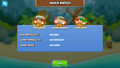
Quick Match allows the player to join any publicly-hosted match that fits within one of three constraints the player can choose from. If the game does not find a match, it creates a new match with a random map (using its default map split), difficulty, and mode within the constraints, then assigns the player to that match. If the game creates a match in this way, it can select maps the host has not unlocked yet.
| Constraint | Map difficulty | Game difficulty | Game mode | Level unlocked |
|---|---|---|---|---|
 Any Game |
Any map | Any difficulty | Any mode | 20 |
 Medium Game |
25 | |||
 Long Game |
30 |
Create Match

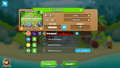
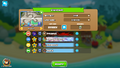
Create Match allows the player to host a match with the map, map split, difficulty, mode, and number of players of their choosing. The host cannot select maps they have not unlocked yet, nor can they select Blons, Protect The Yacht, or Map Editor maps. Matches are private by default, but the host can make them public to allow Quick Match players to join. The host can also invite players on their friends list to join the lobby.
Join Match
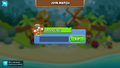
Join Match allows the player to enter a public or private match by using a code or by searching for games hosted on the same local area network.
Modes
Co-op supports the same game modes as offline singleplayer, except Sandbox. Unlike in singleplayer, all modes are accessible without requiring players to complete prerequisite modes first.
Local co-op
Exclusive to the console version of Bloons TD 6, local Co-op is playable by connecting additional controllers to the console. In local Co-op, there is no delay between player inputs and in-game actions occurring (such as placing and upgrading towers). Despite being hosted on one system, local co-op games still cannot be paused or saved. Playing in local co-op earns singleplayer medals instead of co-op medals.
Boss Challenge

Boss Challenge supports Co-op play with the same Normal, Elite, and Battle modes as in singleplayer. Each mode tracks separate high scores for 1-player, 2-player, 3-player, and 4-player games. This is the only way to play Blons and Protect The Yacht in Co-op outside of the occasional events that use them.
Events
Several events support co-op or have separate modes for co-op.
- Co-op Daily Challenges are biweekly Daily Challenges that can only be played in Co-op. In addition to the usual Daily Challenge parameters, Co-op Daily Challenges set the number of players required and the map split.
- Collection Event rewards are also given in Co-op games. Bonus rewards apply if the host selects a map that has a bonus on their account.
- Monkey Teams events are playable in Co-op if the host selects a map that it is currently active on for their account. All players must use the allowed towers to earn the extra Monkey Money.
- Golden Bloon events are playable in Co-op if the host selects a map that it is currently active on for their account. All players earn the same rewards for popping the Golden Bloon, regardless of if they contributed to popping it or not.
- Boss Bloon Events have separate leaderboards for 2-player, 3-player, and 4-player games in both Normal and Elite mode.
Rewards
Monkey Money
Co-op rewards the same amount of Monkey Money as playing in singleplayer, though there is no bonus Monkey Money for earning a new medal. Bloons TD 6+ and Bloons TD 6 NETFLIX players earn 50% more Monkey Money, which is not shared with Bloons TD 6 players.
Due to a bug, the Co-op lobby does not display the Monkey Money reward with  Mo' Monkey Money applied, but all players do earn the extra Monkey Money as long as at least one player has it.
| Version | Mode | Beginner | Intermediate | Advanced | Expert |
|---|---|---|---|---|---|
| Bloons TD 6 | Easy |  15 ( 16) 15 ( 16)
|
25 ( 27)
|
45 ( 49)
|
60 ( 66)
|
| Medium | 30 ( 33)
|
50 ( 55)
|
75 ( 82)
|
100 ( 110)
| |
| Hard | 45 ( 49)
|
75 ( 82)
|
120 ( 132)
|
160 ( 176)
| |
| Impoppable | 60 ( 66)
|
100 ( 110)
|
180 ( 198)
|
240 ( 264)
| |
| Bloons TD 6+ Bloons TD 6 NETFLIX |
Easy | 22 ( 24)
|
37 ( 40)
|
67 ( 73)
|
90 ( 99)
|
| Medium | 45 ( 49)
|
75 ( 82)
|
112 ( 123)
|
150 ( 165)
| |
| Hard | 67 ( 73)
|
112 ( 123)
|
180 ( 198)
|
240 ( 264)
| |
| Impoppable | 90 ( 99)
|
150 ( 165)
|
270 ( 297)
|
360 ( 396)
|
Medals
Co-op medals function mostly the same as the solo medals. The red CHIMPS medal is earned if the player quits and re-joins the game later; this doesn't affect the type of CHIMPS medal the other participants earn, so it's possible for players to get different CHIMPS medals from each other even if they played the same match.
-
 Co-op - Easy - Standard
 -
 Co-op - Easy - Primary Only
 -
 Co-op - Easy - Deflation
 -
 Co-op - Medium - Standard
 -
 Co-op - Medium - Military Only
 -
 Co-op - Medium - Apopalypse
 -
 Co-op - Medium - Reverse
 -
 Co-op - Hard - Standard
 -
 Co-op - Hard - Magic Monkeys Only
 -
 Co-op - Hard - Double HP MOABs
 -
 Co-op - Hard - Half Cash
 -
 Co-op - Hard - Alternate Bloons Rounds
 -
 Co-op - Hard - Impoppable
 -
 Co-op - Hard - CHIMPS
 -
 Co-op - Hard - CHIMPS


Achievements
  |
Co-operation Beat 1 map in Co-op mode Reward(s): 50 Monkey Money
|
|---|
 |
Four times the fun Beat 1 map in 4-player Co-op mode Reward(s): 100 Monkey Money
|
|---|
 |
Triple threat Beat 1 map in 3-player Co-op mode Reward(s): 75 Monkey Money
|
|---|
 10 |
When the going gets tough... Win 10 games on Hard difficulty in Co-op mode Reward(s): 200 Monkey Money,  Super Monkey Storm ×2 Super Monkey Storm ×2
|
|---|
 10K |
Kind Benefactor Give 10,000 Cash in Co-op mode Reward(s): 25 Monkey Money
|
|---|
50K |
Generous Benefactor Give 50,000 Cash in Co-op mode Reward(s): 50 Monkey Money
|
|---|
100K |
Monkey Contributor Give 100,000 Cash in Co-op mode Reward(s): 100 Monkey Money
|
|---|
1M |
Monkey Philanthropist Give 1,000,000 Cash in Co-op mode Reward(s):  Monkey Knowledge Point ×1 Monkey Knowledge Point ×1
|
|---|
 10 |
Powershare Use 10 Powers in Co-op mode Reward(s): 50 Monkey Money
|
|---|
100 |
Power overwhelming! Use 100 Powers in Co-op mode Reward(s): 200 Monkey Money
|
|---|
 5 |
Insta-defense Use 5 Insta Monkeys in Co-op mode Reward(s):  Cash Drop ×2, Cash Drop ×2,  Portable Lake ×1 Portable Lake ×1
|
|---|
 10M |
Co-op Popper Pop 10,000,000 Bloons in Co-op mode Reward(s): 300 Monkey Money
|
|---|
500K |
Bill Greates Send $500,000 to an ally in co-op in one go Reward(s): Cash Drop ×5
|
|---|
Update history

|
This article or section uses Cargo to generate its content. It will automatically fill up as other articles are completed. To add to this section, create the articles it is looking up. Do not add content to this section manually and do not remove this notice until you are sure this section is complete. |
- New callouts: Head Detective, Metal Muncher, Fumigator, Fired Up, BFB Brawler, ZOMG Zapper, DDT Destroyer, Most Generous
- If the player has less than $500, sending cash will now send as much cash as the player has or $100, whichever is lower
- Earning the same medal on a map in both singleplayer and co-op no longer rewards extra Monkey Money with the second medal, only the first
- Round 100 achievements now work in Co-op (bug fix)
- First time completion bonuses are now only rewarded in solo play
- "Substantial refactor of co-op lobbying, connections, and player to player messages, for efficiency and stability"
- "Sent money in co-op should now round off decimal places"
- "Resolved a crash in co-op with players leaving in the lobby"
- "Co-op non-host desync when backgrounding the app has been resolved"
- "Co-op ‘separate game’ desync has been resolved"
- "Co-op ‘Guests’ will now be given names"
- "Co-op ‘Thanos Snap’ bug has had a lot of preventative work done, but we’d appreciate any reports if user still find their towers randomly deleted in co-op."
- "Co-op using a cash drop before everyone has loaded in will no longer desync"
- "Resolved an issue when loading save or co-op resync that would not save any cash gains from the very last attack in each round"
- "Resolved a co-op desync that could cause some players to never see the defeat screen or be able to continue playing"
- "Resolved a co-op desync that could kick every other player from the match"
- "Resolved a co-op issue causing some lower end devices to crash when viewing options"
- Added a message that appears when attempting to join a lobby with a hacker flag
- "Bloons Popped" stat renamed to "Pop Count"
- "Co-op resync should now be less obvious"
- "Reduced memory spike during co-op resync to lessen crashes when this occurs"
- Double Cash Mode now applies in Co-op
- "Resolved an issue where users could create a bugged co-op lobby"
- "Resolved a co-op issue where interactable objects would cause a desync"
- "Local co-op lobbies will no longer disappear from your list while players are still in the lobby if the host leaves"
- Added deep link share buttons, these allows to create a link that will directly open the game on a Co-op lobby or in a custom Challenge
- Note: On the Steam version of the game, the links don't work if the game is already open.
- Continues & Restarts in co-op will now send a message to other players saying that they have been used
- New Co-op Callouts: Boss Crusher, Well Rounded, Endless Power!
- Players creating Co-op lobbies can now choose which Co-op split to use for the match
- 2 new split options added (Radioactive and Stairs)
- Added an audio prompt when players join co-op lobbies
 Resolved a bug preventing Golden Bloons working correctly for all players in co-op (bug fix)
- Co-op hosts will now be able to invite friends directly from the co-op lobby.
- Sword of Protection can now be used in Co-op when the game uses a map split (bug fix)
- The game will now ask for confirmation before removing a disconnected player
- Added a setting to hide the lobby code on-screen
Gallery
Screenshots

|
This article or section needs more screenshots. See the screenshot guidelines for more information on what screenshots are needed and how to add them. The editor that added this notice elaborates: the map list in Co-op mode (preferably with different borders) |
-
 The "Quick Match" screen
 -
 The Co-op lobby
 -
 The "Join Match" feature
 -
 A full Co-op lobby
 -
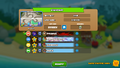 The Co-op lobby loading
 -
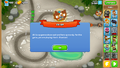 The message that appears when a Co-op game begins
 -
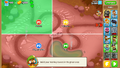 The message about map splits that appears when a Co-op game begins
 -
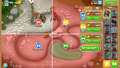 The sidebar for sending cash
 -
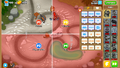 The sidebar for using emotes
 -
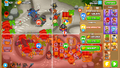 The sidebar for sending cash with a player who disconnected
 -
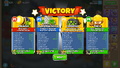 The victory screen in a Co-op game with four different callouts
 -
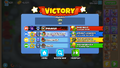 The victory results screen
 -
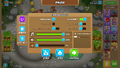 The pause screen in a Co-op game
 -
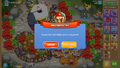 The pop-up that appears when the player disconnects
 -
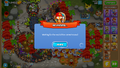 The pop-up that appears when the player is rejoining
 -
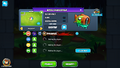 The Boss Challenge Co-op lobby


Assets
-
 Quick match icon
 -
 2-player mode icon (no longer used)
 -
 3-player mode icon (no longer used)
 -
 4-player mode icon (no longer used)
 -
 Any Game icon
 -
 Medium Game icon
 -
 Long Game icon
 -
 Connection error icon


Player icons


References
- ↑ Rohan Sharpe-Anforth. "rohan_spibo comments on Bloons TD 6 - Update Notes! Version 29.0". Reddit. Retrieved Mon, 7 Apr 2025.
- ↑ Rohan Sharpe-Anforth. "rohan_spibo comments on Bloons TD 6 v45.0 - Update Notes!". Reddit. Retrieved Fri, 11 Apr 2025.
Navigation
| Modes in Bloons TD 6 | ||||||||
|---|---|---|---|---|---|---|---|---|
|